Session 02: OS Types and the OS Interface
The plan of the second lecture, the demos run during it, and the points worth writing down.
This is the page used while the lecture is delivered.
The full version -- the same argument in prose, with the diagrams, the reference output and the reading -- is 02-os-types-interface-full/.
Lecture 01 said the operating system is one layer of the software stack. This lecture opens that layer: what it is made of, the interface it offers, the hardware boundary behind the interface, what the boundary costs, and the design choices that follow.
What the lecture answers
- Why is there an operating system at all? The two things it does that no application can do for itself: provide common features, and enforce isolation.
- What is it made of, and how do you talk to it? A library you do not link, reached through the system call interface.
- What makes the boundary a boundary? User mode and kernel mode, enforced by the hardware, and why that is not the same as root and non-root.
- The boundary is expensive; how do you pay less? Buffer in user space, or push work into the kernel.
- Where should the code live? OS types and virtualization as the same protection-against-performance trade-off.
Plan
| Part | Question | Demo | Figure |
|---|---|---|---|
| 00. Pitch | Why is there an operating system at all? | 00-pitch/ |
the storyline |
| 01. What makes an OS | What is an operating system made of? | 01-make-os/ |
OS types |
| 02. The OS interface | How does a program ask the kernel for something? | 02-os-interface/ |
-- |
| 03. Privileged domains | What makes the boundary a boundary? | 03-privileged-domain/ |
mode vs identity |
| 04. Optimizing the interface | The boundary is expensive; how do you pay less? | 04-optimize-os-interface/ |
-- |
| 05. OS types | Where should the code live? | -- | -- |
| 06. Virtualization | What runs the operating system? | -- | virtualization |
| 07. Conclusion | What should survive the week? | -- | -- |
Storyline / Narrative
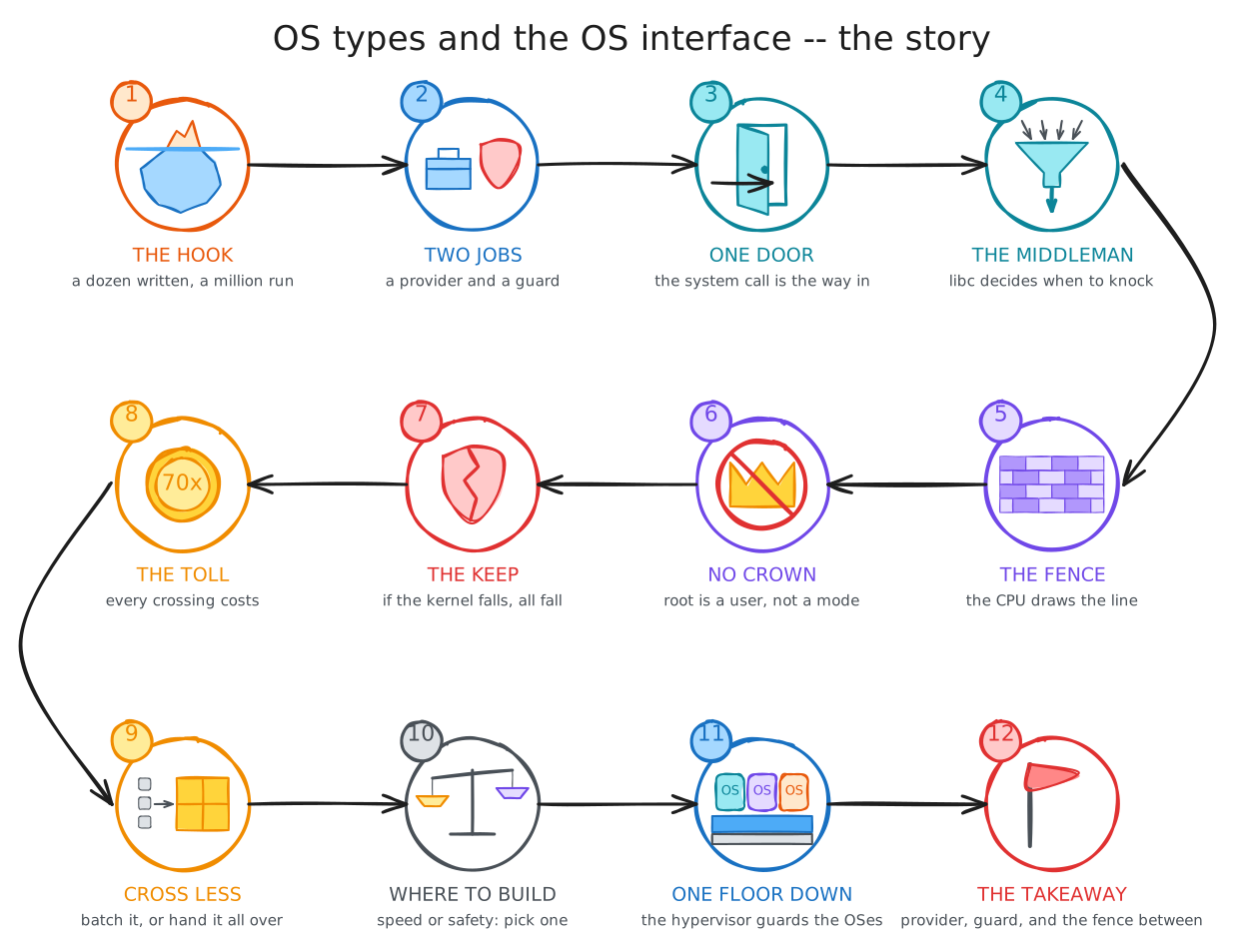
The lecture follows one thread from start to finish, and the figure below walks through it, step by step: the storyline.
- The pitch: you write a dozen instructions to print one line, and the machine runs a million. Almost none of them are yours: they belong to the operating system, which is busy even when you never call it by name.
- A program needs hardware, and hardware is hard to talk to. The CPU runs the instructions, memory holds them, devices bring data in and out, and none of them offers anything as friendly as "open a file".
- The operating system has two jobs: it is a provider, and it is a guard. As a provider, it offers what every program needs: memory, files, processes, networking, devices. As a guard, it keeps programs from breaking each other, because many run at once and some are hostile.
- The OS is a library, but a strange one. You never link it, every program on the machine shares it, and it cannot trust a single one of its callers. Even the smallest OS that can run one program weighs 240 KB.
- There is one way in: the system call.
Put a number in a register, the arguments in other registers, run one
syscallinstruction, and read the answer back.straceshows a program's whole conversation with the kernel, one call per line. - libc calls are not system calls.
A program asks the OS only for what it cannot do itself, because it needs privilege, or does not want to write, because the code is already there.
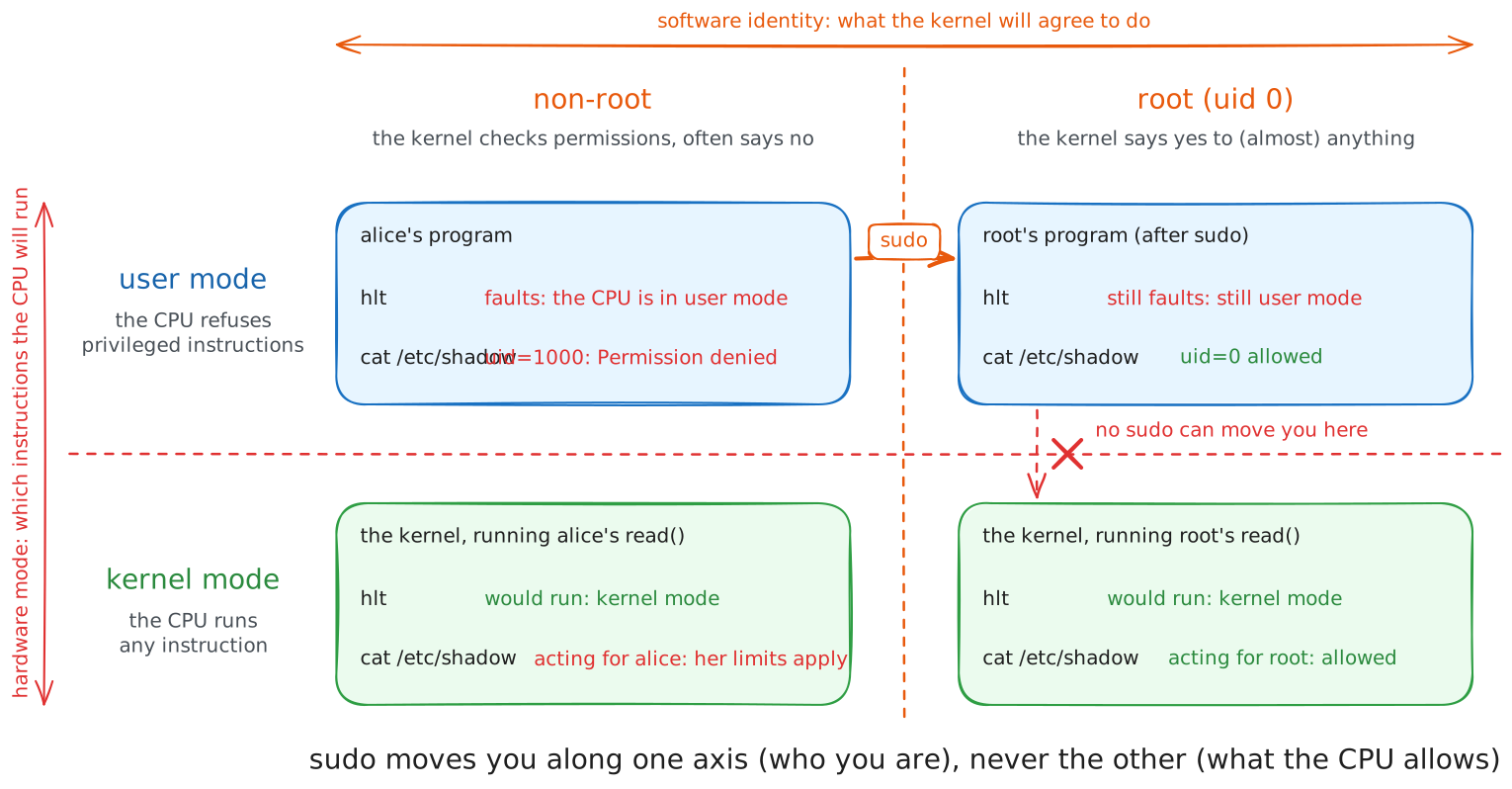
strlen()never asks;getpid()asks every time;printf()asks when its buffer says so. - A guard is useless if it can be pushed aside, so the CPU itself builds the fence. Applications run in user mode, the kernel runs in kernel mode, and the hardware enforces the line between them. Run a privileged instruction in user mode and the CPU stops the program on the spot, with no software involved.
- The fence is about mode, not about who you are. Root is a user, not a mode: root's programs run in user mode too, and crash on the same instruction. The kernel works on behalf of whoever called it, and checks their user ID to decide what they may do.
- Everything rests on the kernel holding. The system call is a function call and a gate at the same time, and the gate is the only way through. A bug in the kernel is a bug in the whole system, and a compromised kernel is a compromised machine.
- Every trip through the gate has a toll. A system call costs about seventy times as much as a function call, even when it does nothing at all. So the goal is simple: cross less.
- There are two ways to cross less, at the two ends of the boundary.
Stay in user space and batch the work, the way a buffer turns thousands of tiny writes into a few large ones.
Or hand the whole job to the kernel and skip the trips, the way
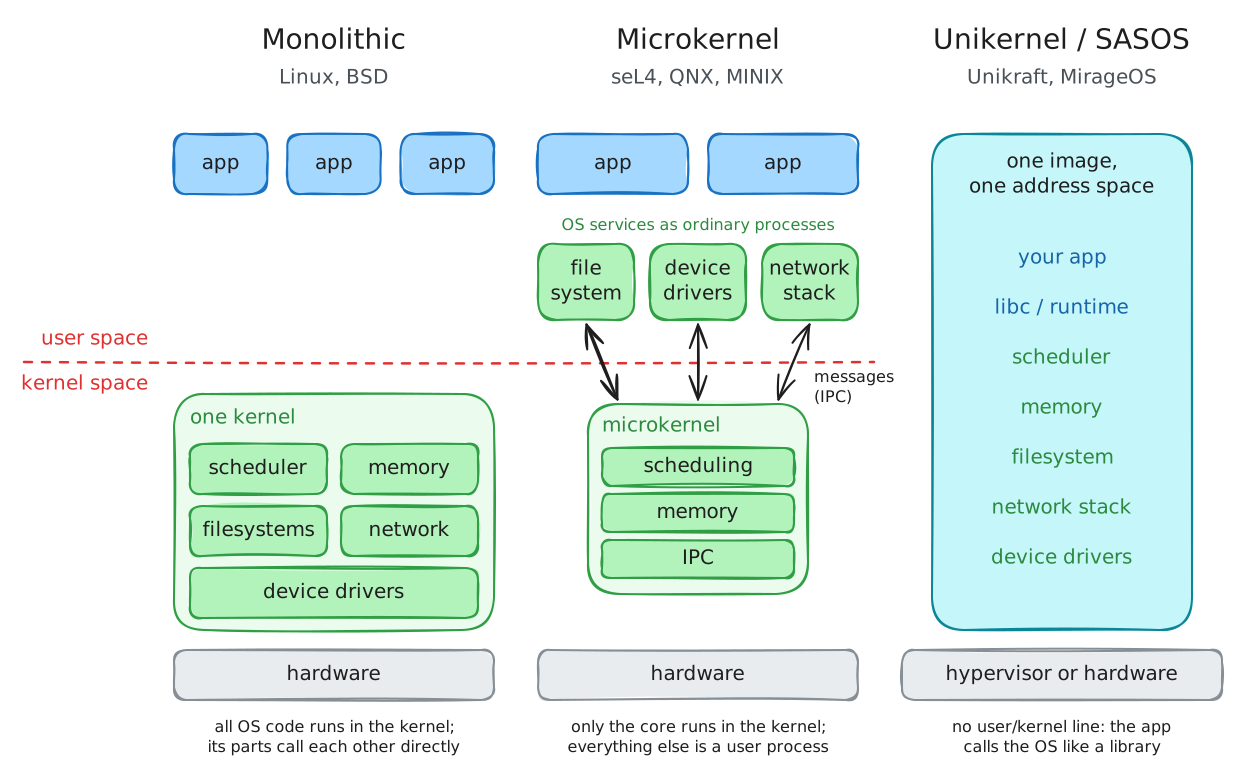
sendfile()moves a file without ever bringing it up to the program. - Where should the code live? Every answer trades speed for safety. A monolithic kernel puts everything inside the fence: fast, but one bad driver can bring it all down. A microkernel moves drivers out as ordinary programs: safer, but every file operation now crosses the fence. A unikernel drops the fence altogether and gets its protection from outside.
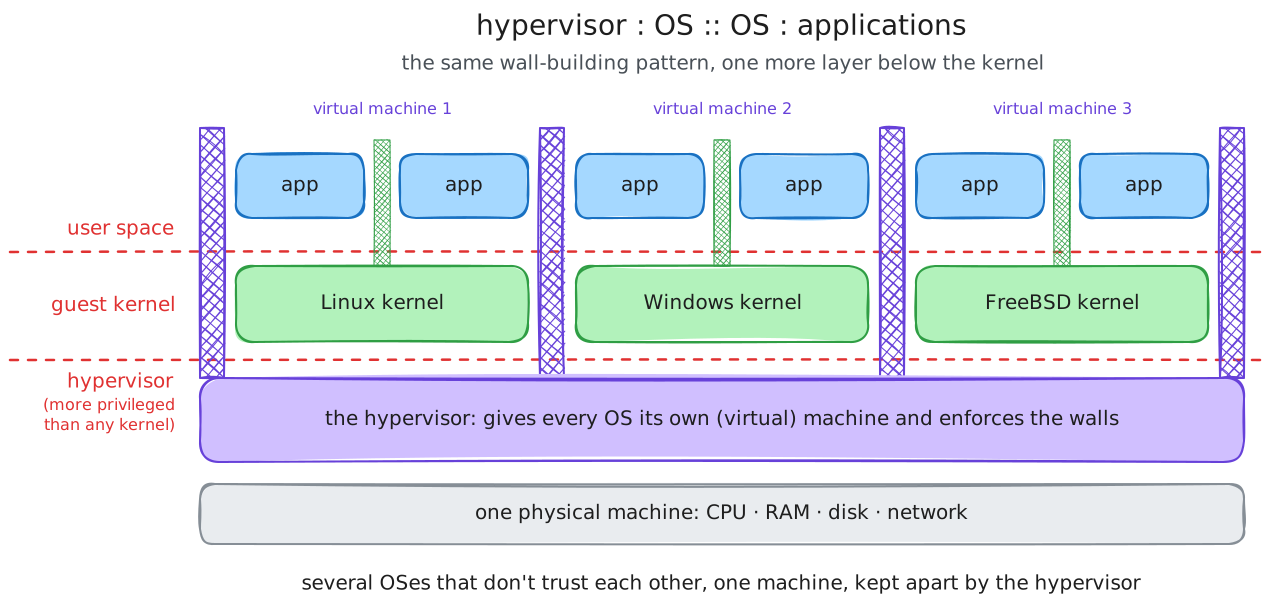
- Outside means one floor lower: virtualization. A hypervisor is to operating systems what an operating system is to applications: more privileged, it shares one machine among them and keeps them apart. If a kernel fails, only its own virtual machine goes down.
- What should survive the week: the OS is a provider and a guard. Its interface is the system call, a door with a fence around it, built into the CPU. Every crossing costs, so good software crosses less, and every OS design is a choice of where to put the fence.
Points to capture
Ten things to have in your notes when you leave.
- The operating system has a dual role: it provides the features every program needs, and it enforces isolation between programs.
- Even a bare program runs mostly kernel instructions; the OS is always there, doing work you did not ask for by name.
- The OS is a library you do not link and cannot trust the way a library trusts its caller, shared by every program at once.
- You reach it through the system call interface: a call number in
rax, arguments in registers, thesyscallinstruction, result back inrax. - libc calls are not system calls. libc decides when to cross into the kernel, and often crosses far less than the code appears to ask.
- The user/kernel boundary is enforced by the hardware: a privileged instruction faults in user mode, with no software check involved.
- Mode is not identity. Kernel/user is a hardware mode; root/non-root is a software identity; they are orthogonal, and root still faults on
cli. - A system call costs hundreds of nanoseconds because of the boundary, so performance work is about crossing it less often.
- Two directions to cross less: buffer in user space (batch the crossings) or push work into the kernel (remove them, like
sendfile()). - OS types and virtualization are the same trade-off made structurally: more in the kernel buys performance and attack surface; a hypervisor is to OSes what an OS is to applications.
Demos
Each directory below holds the commands to run and the one question to ask about the result.
The sources, the reference output and the explanations are in the corresponding 02-os-types-interface-full/demos/ directory.
| Demo | Shows |
|---|---|
00-pitch |
Even a bare Hello, World! runs a hundred thousand to a million instructions, almost all of them the kernel's. |
01-make-os/unikraft |
The smallest specialised OS, built for one program, is still 240 KB and 800 symbols. |
02-os-interface/syscalls |
A program that talks to the kernel through nothing but the syscall instruction. |
02-os-interface/syscall-overhead |
The same trivial write as a system call and as a function call: about seventy times apart. |
03-privileged-domain |
A privileged instruction crashes an ordinary process -- and still crashes it under sudo. |
04-optimize-os-interface/fwrite |
User-space buffering turns per-byte system calls into per-kilobyte ones. |
04-optimize-os-interface/sendfile |
sendfile() beats a read/send loop by keeping the data in the kernel. |
Slides
The deck delivered in the room is slides/os-types-interface-live.html, rendered from slides/os-types-interface-live.qmd.
It is deliberately thin: the diagrams, the demo results, and nothing that is better said than read.
The full deck carries the same structure with the detail filled in.