Session 03: Memory Operations - Full Contents
This is the complete version of the third lecture: the argument in full sentences, the diagrams, the demos with their reference output, and the reading behind each part.
Read it before the lecture if you want to follow the live delivery without taking notes, and after it for everything that was said once and quickly.
The one-page plan used during the lecture is 03-memory-ops-live/.
Lecture 02 listed memory management as one family of system calls. This lecture is about what those calls manage: what memory is to a running program, what a program can do with it, and how the memory of a process is laid out, built and grown. It stays with the program's view of memory; how the kernel and the hardware make that view possible -- virtual memory, paging -- is the subject of lectures 04 and 05.
Learning objectives
By the end of this lecture you should be able to:
- Explain why memory decides whether software works, is correct, is secure, is fast and is frugal, with a measured example of each.
- Describe memory as an array of bytes, an address as an index, a pointer as a variable holding one, and place cache, RAM and disk in a hierarchy of speed and size.
- Name the memory operations -- allocate, deallocate, read, write, execute -- and explain what an access violation is and why it happens.
- Read a process address space as a list of areas, each with a start, a size, permissions and a role, using
pmap. - Tell static areas, created and filled at load time from the executable, from dynamic ones, created and resized at run time.
- Explain how the stack grows by itself, how
malloc()sits on an allocator in libc, and when that allocator asks the kernel throughbrk()ormmap().
What is here
| Part | What it answers | Demos |
|---|---|---|
| 00. Pitch | Why care about memory at all? | 00-pitch/ |
| 01. Memory and the CPU | What is memory to a program, and where does it sit? | -- |
| 02. Memory operations | What can a program do with memory, and what stops it? | 02-memory-operations/ |
| 03. The process address space | What does the memory of a process look like? | 03-address-space/ |
| 04. When memory is allocated | Which areas exist before main(), and where do they come from? |
04-allocation-time/ |
| 05. Run-time allocation | How do the stack, the heap and mappings grow and shrink? | 05-runtime-allocation/ |
| 06. Conclusion | What should survive the week? | -- |
The slides are in slides/; the demos, with build instructions and reference output, are in demos/.
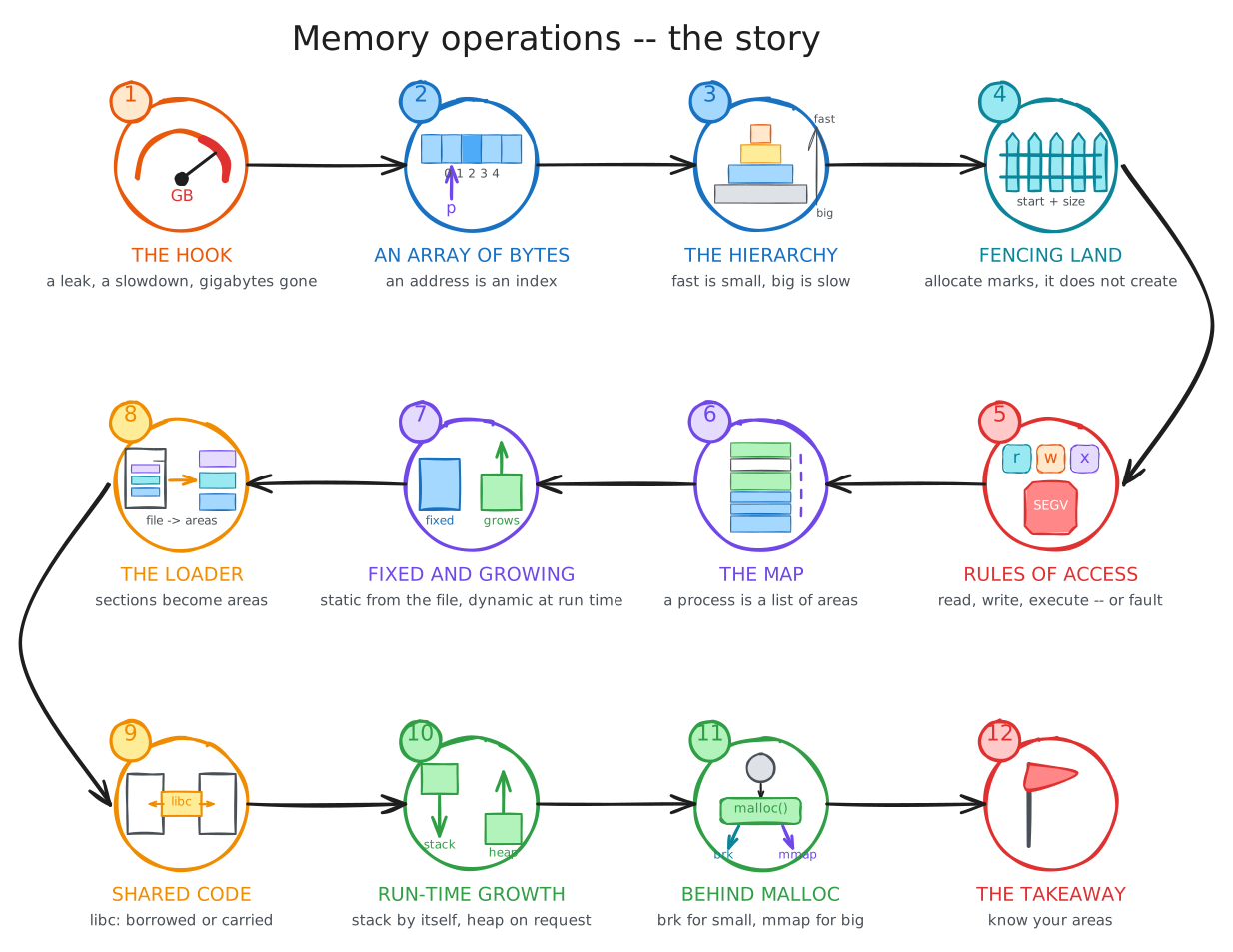
The planned narrative of the live delivery is in STORYLINE.md, with the storyline figure that walks through it.
00. Pitch: Why Care About Memory?
Before any definitions, four things to look at.
Memory is what runs out. Sort the processes on a desktop by resident memory and the top of the list is the browser, by a wide margin, with a chat client not far behind:
$ ps -e -o pid,comm,rss --sort -rss | head -5
    PID COMMAND           RSS
  33283 chrome          1657396
  31705 chrome          1394884
  32312 chrome          982264
  34405 Discord          850136
That is 1.6 GB for one browser process, and there are dozens of them. It is the reason memory is the first thing anyone upgrades, and the reason the memes write themselves.
Memory you do not see is still working for you.
free -h on the same machine shows 25 GB used by programs and 31 GB under buff/cache: copies of files recently read from disk, kept in memory by the kernel in case they are needed again.
Drop that cache (echo 3 | sudo tee /proc/sys/vm/drop_caches) and the machine turns sluggish: every program start, every file open, goes back to the disk until the cache refills.
The buffer cache demo does exactly that, and it is a demo to run on your own machine, not on one you share.
Where data sits in memory decides how fast the program runs. Two programs fill the same 64 MB array, one row by row and one column by column. They execute the same number of instructions, to within a tenth of a percent, and one takes nine times as long:
$ sudo perf stat -e instructions,cache-misses ./row
     1,279,597,512      instructions
         1,261,585      cache-misses
       0.089 seconds time elapsed

$ sudo perf stat -e instructions,cache-misses ./column
     1,280,513,994      instructions
        57,935,620      cache-misses
       0.910 seconds time elapsed
The difference is forty-six times more cache misses: the column version touches a different 8 KB row of the array on every step, so the CPU's cache never holds what comes next. The cache-memory demo is the two programs and the measurement.
Memory you forget to give back is gone.
A task scheduler allocates a name for each task and frees the task but not the name.
The leak is 40 bytes at a time, and it is enough to take down a spacecraft: the Mars Pathfinder lander's 1997 resets came from memory handling in exactly this style of code.
valgrind finds the educational version in seconds:
$ valgrind --leak-check=full ./task > /dev/null
==758988== 39,556 bytes in 4,000 blocks are definitely lost in loss record 1 of 1
==758988==    at 0x484A858: malloc (in /usr/libexec/valgrind/vgpreload_memcheck-amd64-linux.so)
==758988==    by 0x4939EDE: strdup (strdup.c:42)
==758988==    by 0x109253: createTask (task.c:25)
The memory-leak demo has the program and the full report.
Four measurements, four reasons memory matters:
- Functionality: a program is instructions and data, and both live in memory; no memory, no program.
- Correctness: using memory wrongly -- outside an area, after freeing it, without permission -- crashes the program or, worse, does not.
- Security: a program that reads past a buffer leaks information, and one that writes past it can be made to run code it never contained.
- Performance: placing data so that the cache holds it is the difference between 0.09 and 0.9 seconds above.
- Efficiency: memory that is allocated and not used, or used and not returned, is memory nobody else can have.
Takeaway. Memory decides whether a program runs, whether it is right, whether it can be attacked, how fast it goes and how much it costs. Every one of those is a property of how the program uses its memory, and that use is what this lecture is about.
01. Memory and the CPU
An array of bytes
To the CPU, memory is one long array of bytes. Each byte has an address, its index in the array, and the address is the only name a byte has.
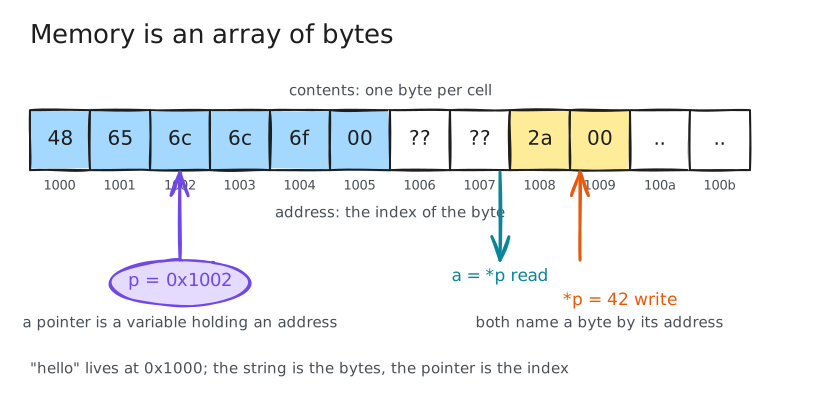
Everything a program is made of lives in that array: its instructions, which the CPU fetches one after another, and its data, which the instructions read and write.
The CPU does two things to memory, read and write, and both name their byte by its address.
A pointer is a variable whose value is an address; *p reads the byte at that address, *p = 42 writes it, and p++ moves to the next one.
C makes this visible, which is why C is the language of this lecture: p is an index into the array, and every bug in parts 02 and 05 is an index that is wrong.
Who uses memory
Two kinds of software use memory, and lecture 02 told them apart. Processes use it in user mode, each one its own slice; the kernel uses it in kernel mode, for its own code and data and for the bookkeeping of every process. The kernel also decides which process gets which slice, and that is the one piece of its work that this lecture takes for granted: the physical memory is shared, and the sharing is next lecture's story.
The hierarchy
Memory is fast compared to a disk and slow compared to the CPU, and both gaps are large.
| Level | Size | Time to get a byte | Holds |
|---|---|---|---|
| registers | bytes | a cycle | what the instruction uses now |
| cache | kilobytes to megabytes | nanoseconds | what was used recently |
| memory (RAM) | gigabytes | around a hundred nanoseconds | the running programs |
| storage (disk, SSD) | terabytes | microseconds to milliseconds | everything, persistently |
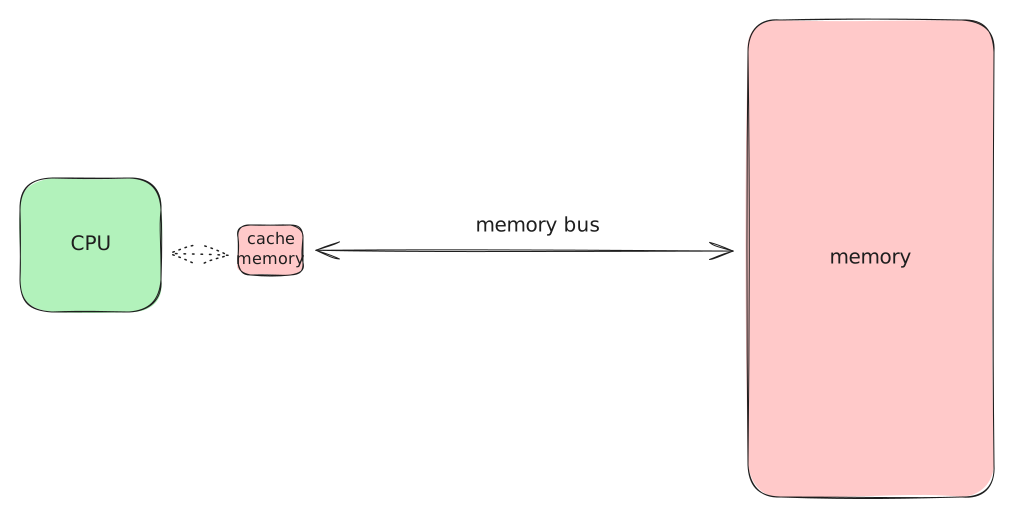
The CPU talks to memory over the memory bus, and because memory is a hundred times slower than the CPU, a small, fast cache sits between them, holding copies of what was used recently. A program whose next byte is already in the cache runs at CPU speed; one whose next byte is not waits for memory. The pitch's row-versus-column programs are the whole story in one example: same instructions, same bytes, nine times slower, because the cache held the next byte for one and not for the other.
Storage is slower again, by a thousand times or more, and it is where a program lives when it is not running.
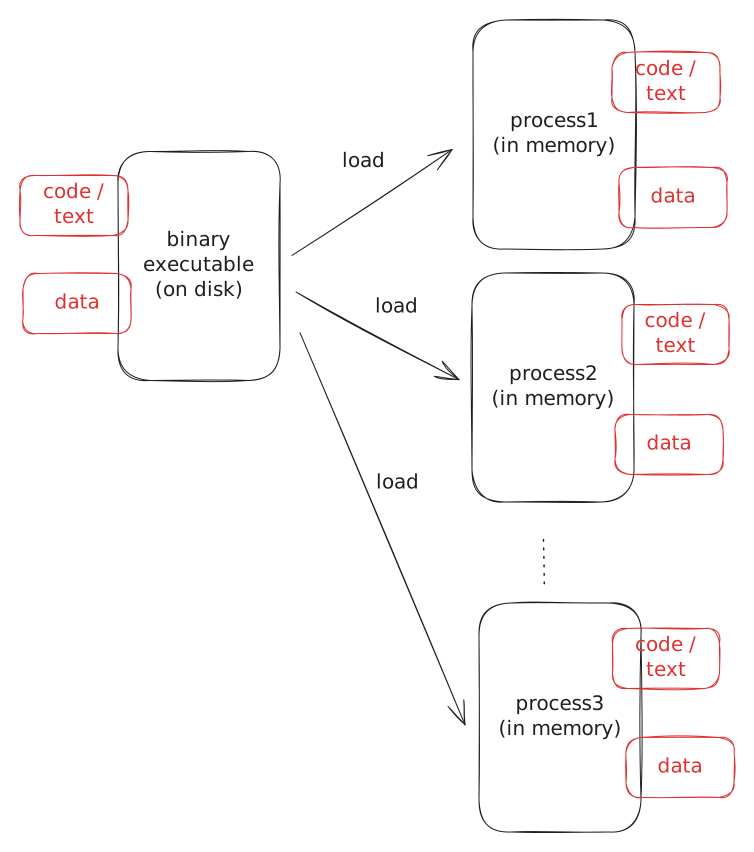
An executable is a file on disk. Running it means loading it: copying its code and data from the file into memory, once per process, so that the CPU can fetch from it. Three processes started from the same file each get their own copy of the data and -- this is lecture 04's business -- share the code. Storage is for persistence, memory is for running; a machine without a disk can still run programs, by loading them from the network, but a machine without memory cannot run anything.
The buffer cache
The gap between memory and storage is where the kernel spends memory to save time.
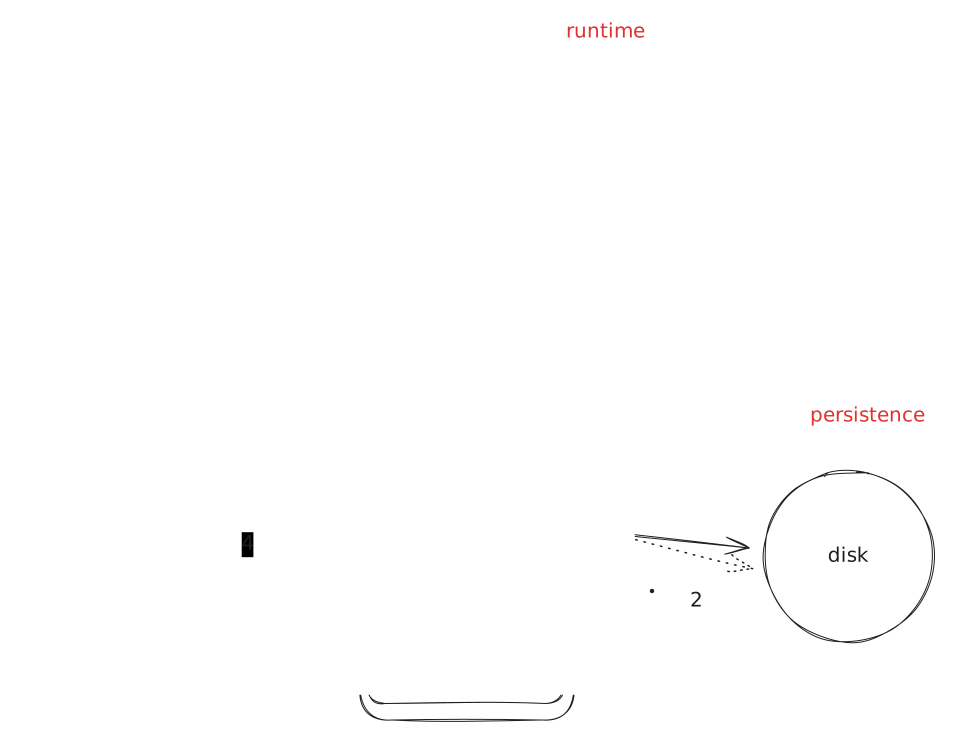
When a program asks for data from a file (1), the kernel reads it from the disk into memory it owns, the buffer cache (2), and hands the program a copy (3). The next request for the same data is served from the cache (4), at memory speed, with no disk involved. Physical memory is therefore divided four ways: memory for processes, memory for the kernel, the buffer cache, and free memory -- and on a running machine the buffer cache is often the largest slice, because free memory does nothing and cached data saves a disk read. Writes go the same way, to the cache first and to the disk later, which is why pulling out a USB stick without unmounting it loses data.
Takeaway. Memory is an array of bytes, an address is an index into it, and a pointer is a variable holding an address. Between the CPU and the disk, each level of the hierarchy is bigger and slower than the one above, and the cache and the buffer cache exist to hide the gaps.
02. Memory Operations
Allocate and deallocate
A program cannot use any byte it likes. Before using memory it has to allocate it: ask for a region of a given size and get back its start address.
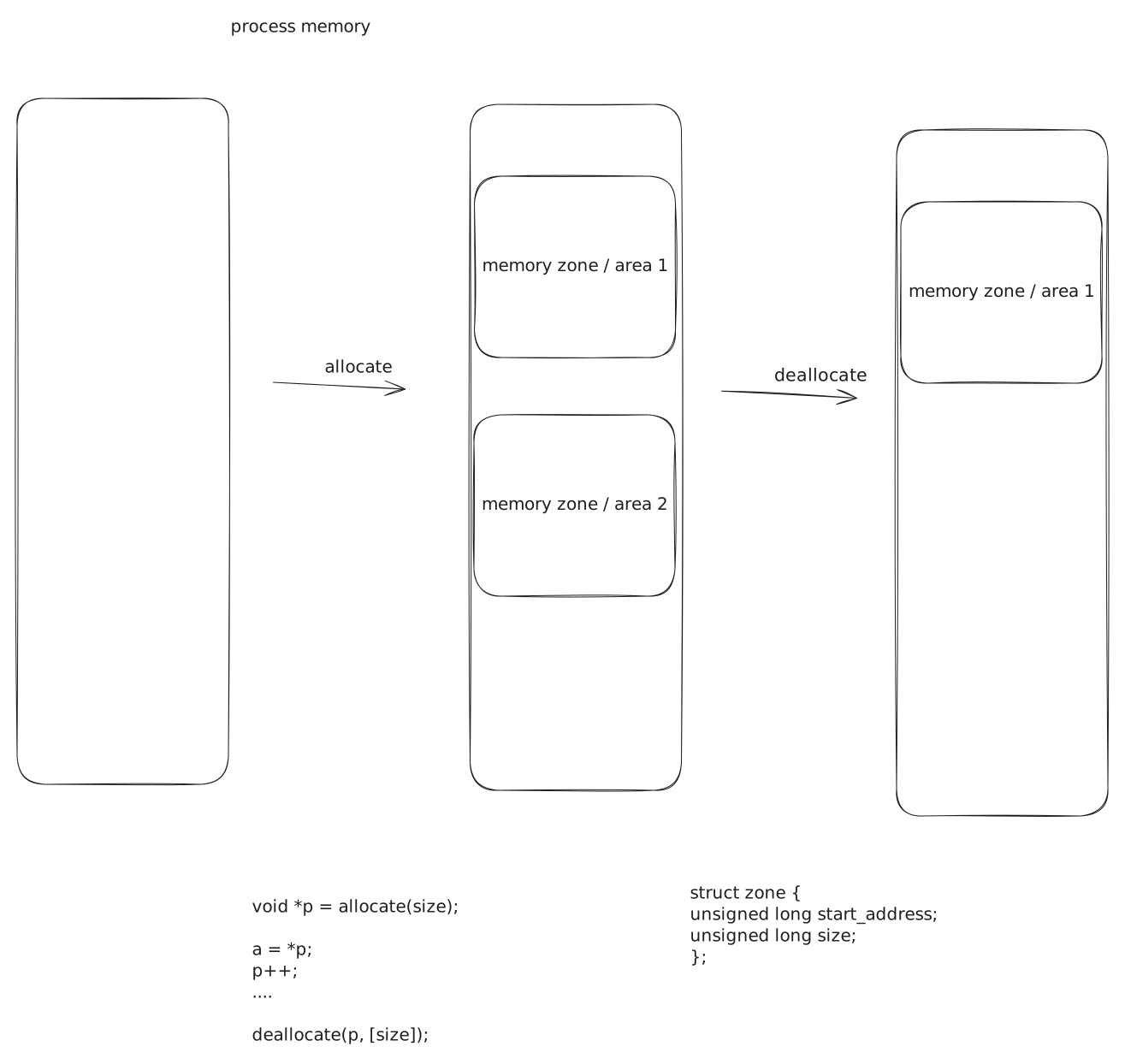
Allocation does not create memory. The bytes were there all along; allocating marks them as belonging to this program, for this purpose, so that nobody else will be handed them and the program itself can tell what is its own. It is fencing off land, not making it.
The unit of allocation is an area: a contiguous range of addresses, described by where it starts and how long it is.
Allocation takes a size and does one of two things: it creates a new area, or it extends an existing one. Deallocation is the mirror image: it removes an area, or shrinks one.
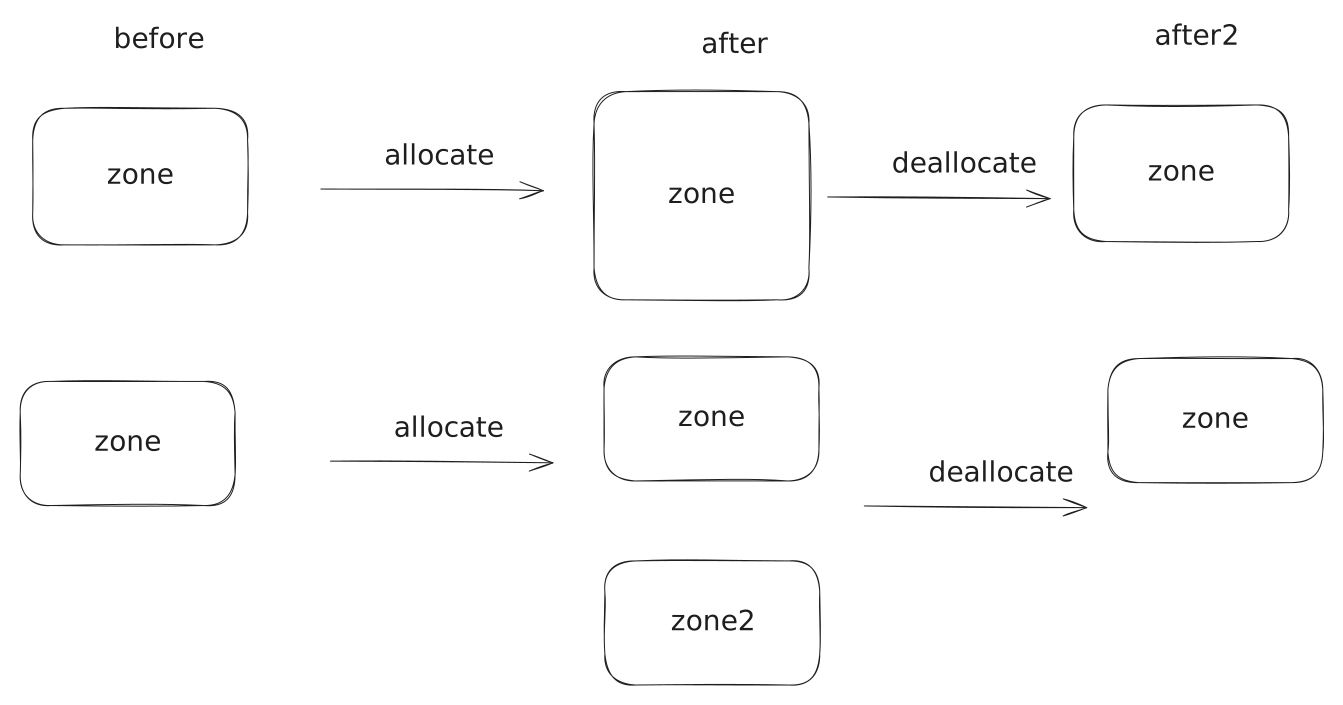
Which of the two happens is up to whoever manages the memory, not to the program asking: a malloc() may extend the heap or may create a fresh mapping, and part 05 shows the allocator choosing.
Use: read, write, execute
Once allocated, memory is used by addressing it -- forming the address of a byte in a pointer -- and accessing it. There are three accesses, and the third is the one people forget:
- read: the CPU loads from the address,
a = *p - write: the CPU stores to the address,
*p = a - execute: the CPU fetches an instruction from the address, which happens whenever control is transferred there -- a call through a function pointer, a return, a jump
Every area carries permissions saying which of the three it allows, written rwx the way ls -l writes them.
The permissions are not advice.
Accessing an address outside any area, or inside one in a way its permissions do not allow, makes the hardware stop the instruction and tell the kernel, which tells the program with a signal: SIGSEGV, the segmentation fault.
There is no software check in the path, which is the same mechanism lecture 02 used to protect the kernel from the program, now protecting the program's own areas from each other.
The basic-memory-operations demo does all five operations in twelve lines:
$ ./basic
----- Allocate memory -----
----- Write to memory -----
----- Read from memory -----
----- Execute memory -----
Segmentation fault (core dumped)
It allocates a kilobyte with malloc(), writes the byte 0xc3 -- the x86 ret instruction -- into it, reads it back, and then jumps to it.
Allocating, writing and reading work.
Executing does not, because the heap is rw-: it may be read and written but not executed, and the jump is stopped by the hardware with a SEGV_ACCERR -- an access to an address that exists, in a way that is not allowed.
That permission is deliberate: an attacker who can write bytes into a buffer must not be able to run them.
The memory-access demo runs the same three accesses against the areas a program already has: reading and writing the data area work, reading and executing the code area work, and the three commented-out lines -- execute data, write code, read address zero -- each fault when uncommented.
Takeaway. Memory is allocated before use and deallocated after, by areas: a start and a size, created, extended, shrunk or removed. It is used by reading, writing and executing through an address, each area says which of the three it allows, and anything else is a segmentation fault delivered by the hardware.
03. The Process Address Space
A list of areas
Put all the areas of one process together and you have its address space: the complete set of addresses the process may use, with what each range is for and what it allows.
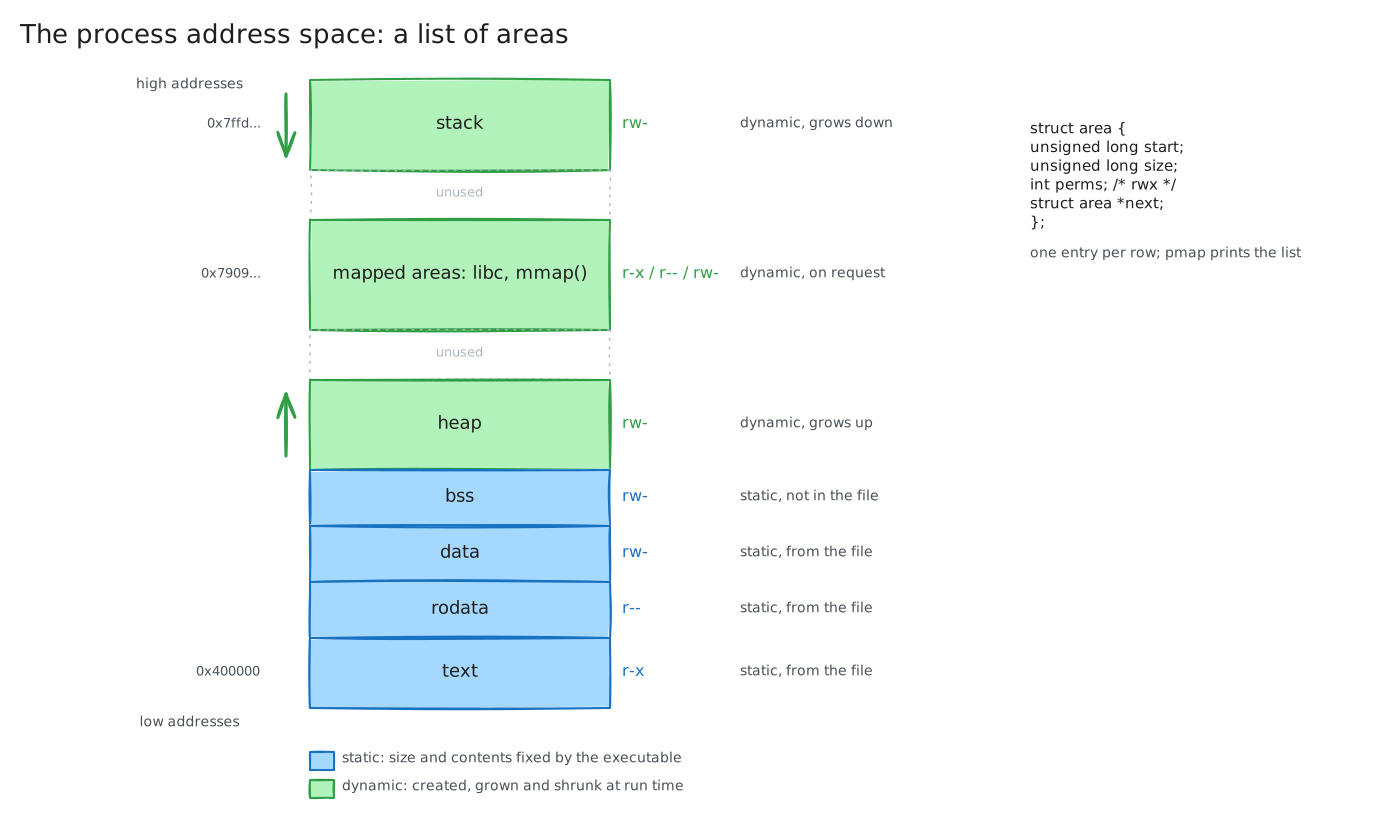
It is nothing more than a list of struct area, each now with permissions and a role, and the kernel keeps exactly such a list for every process.
pmap prints it.
The see-pmap demo is a program that waits so that you can look, built twice, statically and dynamically; this is the static one, before it allocates anything:
$ pmap -x $(pidof see-pmap-static)
Address           Kbytes     RSS   Dirty Mode  Mapping
0000000000400000       4       4       4 r---- see-pmap-static
0000000000401000     564     564     564 r-x-- see-pmap-static
000000000048e000     172     164     164 r---- see-pmap-static
00000000004b9000      20      20      20 r---- see-pmap-static
00000000004be000      24      24      24 rw--- see-pmap-static
00000000004c4000      40      16      16 rw---   [ anon ]
0000000034c5d000     136      16      16 rw---   [ anon ]
00007909e9cd8000       8       4       0 r-x--   [ anon ]
00007ffd49694000     136      12      12 rw---   [ stack ]
ffffffffff600000       4       0       0 --x--   [ anon ]
---------------- ------- ------- -------
total kB            1124     824     820
Each line is one area: its start address, its size, how much of it is actually in memory (RSS), its permissions, and what backs it -- the executable file, the stack, or nothing in particular ([ anon ], anonymous memory, which is what allocations are).
Low addresses, from 0x400000, hold the areas that came from the executable: code (r-x), read-only data (r--), writable data (rw-).
The anonymous area right after them is the heap; the [ stack ] sits near the top of the address space; between the two is almost the whole 47-bit range, unused.
Under gdb, info proc mappings prints the same list with the heap labelled:
(gdb) info proc mappings
0x0000000000400000 0x0000000000401000  r--p  see-pmap-static
0x0000000000401000 0x000000000048e000  r-xp  see-pmap-static
0x000000000048e000 0x00000000004b9000  r--p  see-pmap-static
0x00000000004be000 0x00000000004c4000  rw-p  see-pmap-static
0x00000000004ce000 0x00000000004f0000  rw-p  [heap]
0x00007ffff7ffd000 0x00007ffff7fff000  r-xp  [vdso]
Roles
The areas are not interchangeable; each has a job, and the job fixes its permissions and whether it can change size.
| Area | Holds | Permissions | Size | Comes from |
|---|---|---|---|---|
| text | the code | r-x |
fixed | the executable |
| rodata | constants, string literals | r-- |
fixed | the executable |
| data | initialised globals | rw- |
fixed | the executable |
| bss | uninitialised globals, zeroed | rw- |
fixed | the executable says how much; nothing to copy |
| heap | malloc()'d memory |
rw- |
grows and shrinks | brk() at run time |
| stack | local variables, call frames | rw- |
grows down on demand | the kernel at run time |
| mapped areas | mmap()'d memory, shared libraries |
as requested | created and removed | mmap() at run time |
The first four are static: their size and their contents are decided by the executable, and they exist, fully populated, before the first instruction of the program runs. The last three are dynamic: they are created or resized while the program runs, and they start out as zeroes rather than as contents from a file. Part 04 is about the first kind, part 05 about the second.
Static and dynamic executables
Run the same program built dynamically and the list roughly doubles:
$ pmap -x $(pidof see-pmap)
Address           Kbytes     RSS   Dirty Mode  Mapping
0000000000400000       4       4       4 r---- see-pmap
0000000000401000       4       4       4 r-x-- see-pmap
0000000000402000      20      20      20 r---- see-pmap
0000000000408000      20      20      20 rw--- see-pmap
000000000040d000      16       0       0 rw---   [ anon ]
0000000021172000     132      12      12 rw---   [ anon ]
00007b222c800000     160     156       0 r---- libc.so.6
00007b222c828000    1620    1112       0 r-x-- libc.so.6
00007b222c9bd000     316      64       0 r---- libc.so.6
00007b222ca0c000      16      16      16 r---- libc.so.6
00007b222ca10000       8       8       8 rw--- libc.so.6
00007b222cafb000       4       4       0 r---- ld-linux-x86-64.so.2
00007b222cafc000     184     184       0 r-x-- ld-linux-x86-64.so.2
00007ffe0519b000     136      20      20 rw---   [ stack ]
---------------- ------- ------- -------
total kB            2804    1724     156
The executable's own code area shrank from 564 KB to 4 KB: libc is no longer inside it.
Instead libc.so.6 appears as a set of mapped areas of its own -- code, read-only data, writable data, with the same permissions pattern as the executable's -- and so does the dynamic loader, ld-linux-x86-64.so.2, which is what put them there.
Lab 01 built both kinds of executable; this is what the difference looks like from the inside.
Note the RSS column for libc's code: 1112 KB resident, 0 KB dirty.
Those pages are shared with every other process on the machine that uses libc, and that sharing is lecture 04's reason for existing.
Takeaway. A process address space is a list of areas, each with a start, a size, permissions and a role, and
pmapprints it. Code, constants, data and bss are static and come from the executable; heap, stack and mappings are dynamic and are made at run time; a dynamic executable adds the areas of every library it loads.
04. When Memory Is Allocated
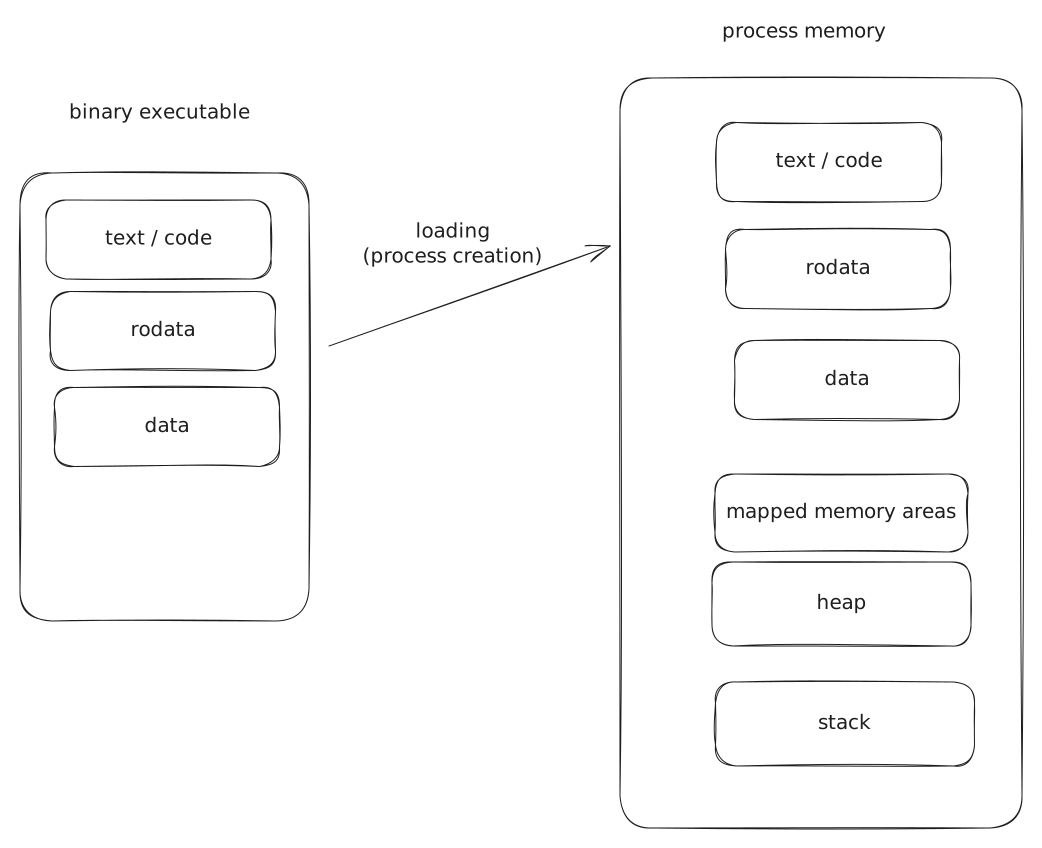
Two moments
An area comes into existence at one of two moments, and the moment decides everything else about it.
At load time, when the kernel creates the process from the executable, it allocates the static areas and populates them from the file in one step.
Nothing in the program asked for them; they are there before main().
At run time, while the program executes, the dynamic areas are allocated: the stack as functions are called, the heap and mappings as the program asks. They are allocated empty -- zero-filled -- and the program fills them with whatever it computes.
The loader builds the map
An executable is organised in sections, and the sections map onto the static areas one to one.
readelf -S lists them for the static see-pmap:
  [Nr] Name              Type            Address          Off    Size
  [ 6] .text             PROGBITS        00000000004011c0 0011c0 08c18d
  [ 8] .rodata           PROGBITS        000000000048e000 08e000 0209fc
  [22] .data             PROGBITS        00000000004be0c0 0be0c0 005a20
  [23] .bss              NOBITS          00000000004c3ae0 0c3ae0 009828
Every section says at which address it must land and how big it is; the loader -- the part of the kernel that runs execve(), and for a dynamic executable also ld-linux -- creates an area at that address, of that size, with the permissions the section asks for, and copies the section's bytes into it.
That is why the pmap output in part 03 starts at 0x400000 with four areas whose permissions go r--, r-x, r--, rw-: they are the ELF header, .text, .rodata and .data, in the order the file holds them.
One section is different.
.bss is marked NOBITS: it has an address and a size but occupies no bytes in the file, because everything in it is zero and there is no point storing 38 KB of zeroes.
The loader allocates the area and zero-fills it.
size shows the three numbers side by side:
$ size see-pmap-static
   text    data     bss     dec     hex filename
 749834   41848   39016  830698    cacea    see-pmap-static
text and data are bytes in the file and bytes in memory; bss is bytes in memory only.
A program with a 100 MB uninitialised global array is a small file that becomes a large process.
Seeing it from inside the program
The allocation-types demo declares one variable of each kind and prints where it lives:
init_data: 0x408080              .data   -- initialised global
non_init_data: 0x40c0e0          .bss    -- uninitialised global
ro_data: 0x402020                .rodata -- const global
stack_buffer: 0x7ffd4f5633f0     stack   -- local array
alloca_buffer: 0x7ffd4f5633e0    stack   -- alloca()
local_scope_data: 0x4080a0       .data   -- static local
heap_data: 0x316932c0            heap    -- malloc()
mapped_data: 0x7c51ef5c0000      mapping -- mmap()
The addresses sort the variables into their areas without any further help.
Everything near 0x400000 is static and was placed by the linker before the program ever ran; nm allocation-types prints the same addresses from the file, and that is the proof: the executable already knows where init_data will be.
Everything near 0x7ff... is on the stack, the heap is just above the static areas, and the mapping is wherever the kernel found room.
The one surprise is local_scope_data, declared inside a function but static: static means "allocated at load time", not "visible everywhere", and it lands in .data next to the globals.
Takeaway. Static areas are allocated and populated at load time by the loader, one per executable section, at the address the file says;
bssis the section that costs nothing on disk because it is all zeroes. Dynamic areas are allocated at run time, empty, and filled by the program;staticis about when a variable is allocated, not where it is visible.
05. Run-Time Allocation
Implicit and explicit
Run-time allocation happens in two styles.
The stack is implicit: calling a function allocates its frame, returning frees it, and no line of the program says so.
The heap and memory mappings are explicit: the program calls malloc() or mmap() and gets an address, and calls free() or munmap() to give it back.
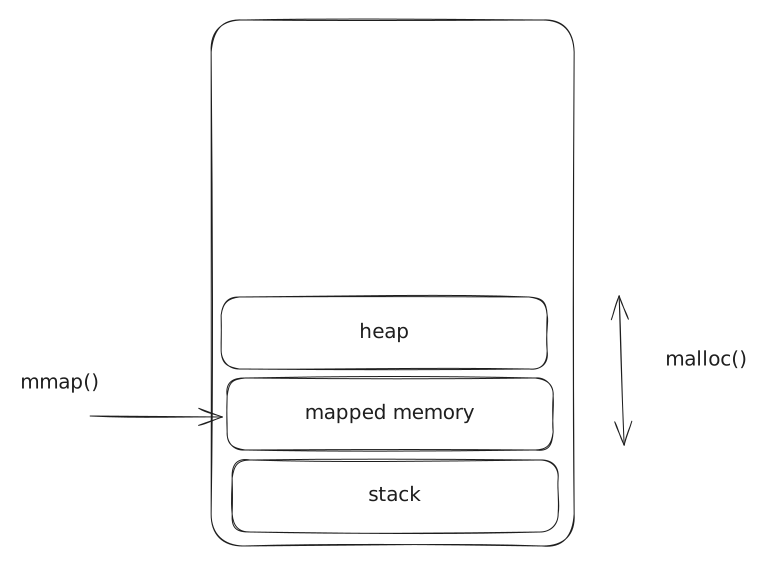
The allocation demo does one of each while you watch its pmap from another terminal.
The stack grows by itself.
Before anything happens the stack area is 136 KB, with 16 KB actually in use.
A function that allocates 64 KB in its frame -- alloca() here, a local array in the usual case -- and touches it pushes the resident part to 76 KB and the area itself does not change: the kernel had reserved more than was used.
A hundred recursive calls each carrying a 4 KB array go past the reservation, and the area grows to meet them:
00007ffc7f72d000     136      16      16 rw---   [ stack ]      before
00007ffc7f72d000     136      76      76 rw---   [ stack ]      after alloca(64 KB)
00007ffc7f6e6000     420     420     420 rw---   [ stack ]      100 calls deep
The start address moved down by 284 KB: the stack grows towards lower addresses, and the kernel extended the area on the first access past its end, with no system call from the program. The frames are freed when the calls return, but the area is not shrunk; it stays at 420 KB for the rest of the run.
The heap grows on request.
Four malloc(64 KB) calls in a row, and the anonymous area above the static ones grows from 132 KB to 268 KB; four free() calls, and it shrinks to 140 KB:
00005c74ca0dc000     132      12      12 rw---   [ anon ]      before
00005c74ca0dc000     268     268     268 rw---   [ anon ]      after 4 x malloc(64 KB)
00005c74ca0dc000     140     140     140 rw---   [ anon ]      after 4 x free()
A mapping is an area of its own.
mmap() of 64 KB adds a new [ anon ] area at a high address, next to the libraries; munmap() removes it.
The total goes up by 64 KB and comes back down.
What malloc() does
malloc() is not a system call, and the heap it hands out is not managed by the kernel.
It is a libc function, and behind it sits an allocator: code that owns the heap area, splits it into chunks of the sizes programs ask for, and remembers which chunks are free.
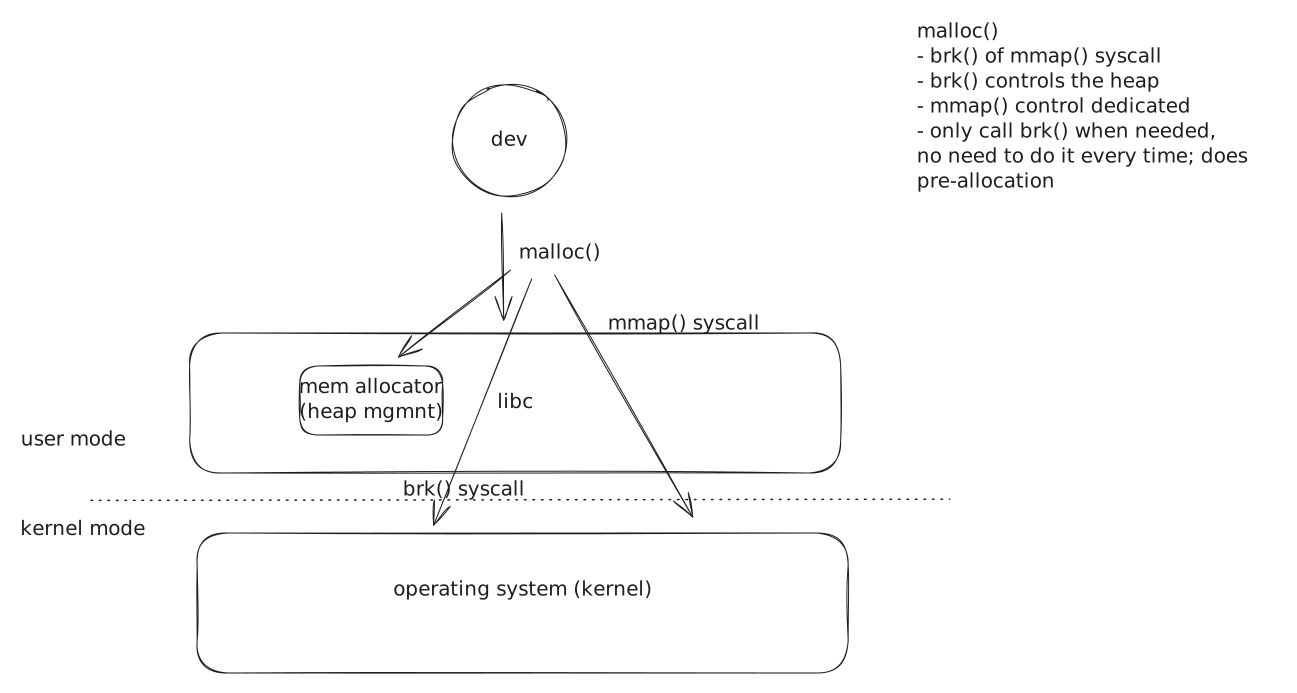
The allocator asks the kernel for memory only when it runs out, through one of two system calls:
brk()moves the end of the heap area up or down. It is how the heap grows: one contiguous area, extended at the top.mmap()creates a new area anywhere in the address space, andmunmap()removes it. The allocator uses it for large requests, which get an area of their own.
The malloc-kb demo makes ten malloc() calls of a size given on the command line, and strace shows which system call each one turned into.
Ten allocations of 100 KB:
$ strace -e trace=brk,mmap,munmap ./malloc_kb 100
brk(NULL)                               = 0x62161b3b5000
brk(0x62161b3d6000)                     = 0x62161b3d6000
brk(0x62161b408000)                     = 0x62161b408000
brk(0x62161b43a000)                     = 0x62161b43a000
brk(0x62161b46c000)                     = 0x62161b46c000
brk(0x62161b49e000)                     = 0x62161b49e000
brk(0x62161b4d0000)                     = 0x62161b4d0000
brk(0x62161b4b7000)                     = 0x62161b4b7000
Ten malloc() calls became six brk() calls that grow the heap by 200 KB each: the allocator asks for more than it needs, so that the next malloc() is served without a system call at all.
The final brk() moves the end down: the one free() at the end of the program returned the top chunk, and the allocator gave part of the heap back.
Ten allocations of 1000 KB:
$ strace -e trace=brk,mmap,munmap ./malloc_kb 1000
mmap(NULL, 1028096, PROT_READ|PROT_WRITE, MAP_PRIVATE|MAP_ANONYMOUS, -1, 0) = 0x765b4323e000
mmap(NULL, 1028096, PROT_READ|PROT_WRITE, MAP_PRIVATE|MAP_ANONYMOUS, -1, 0) = 0x765b42f05000
...
mmap(NULL, 1028096, PROT_READ|PROT_WRITE, MAP_PRIVATE|MAP_ANONYMOUS, -1, 0) = 0x765b4272d000
munmap(0x765b4272d000, 1028096)         = 0
Above a threshold -- 128 KB in glibc, by default -- every request gets its own mmap(), and free() becomes munmap().
Large blocks are not worth managing inside the heap: they would fragment it, and giving them back to the kernel in one piece is cheaper than keeping a hole.
This is the pattern of lecture 02 again, seen from the memory side.
libc sits between the program and the kernel, serves most requests without crossing into the kernel at all, and crosses in bulk when it has to.
The cost it hides is the system call; the cost it introduces is that the memory malloc() has reserved and not handed out is memory the rest of the system cannot use.
Takeaway. At run time the stack grows by itself, on demand, and the heap and mappings grow on request.
malloc()is a library function over an allocator that owns the heap; the allocator callsbrk()to extend the heap for small requests andmmap()for large ones, and it asks the kernel for more than it needs so that it can ask less often.
06. Conclusion
The lecture covered:
- why memory matters -- functionality, correctness, security, performance, efficiency -- with a measurement for each
- memory as an array of bytes, addresses and pointers, and the hierarchy from cache to disk with the buffer cache in between
- the memory operations: allocate and deallocate, by areas; read, write and execute, by permissions; and the segmentation fault for everything else
- the process address space as a list of areas with roles, static ones from the executable and dynamic ones made at run time
- the loader turning sections into areas at load time, and
bsscosting nothing on disk - the stack growing by itself,
malloc()sitting on an allocator, andbrk()andmmap()as the two ways the allocator asks the kernel
If one thing survives the week, make it this.
Takeaway. A process sees its memory as a list of areas, each with a start, a size, permissions and a role. The static areas are built from the executable before the program starts; the dynamic ones -- stack, heap, mappings -- are grown and shrunk while it runs, by the kernel for the stack and by libc's allocator, over
brk()andmmap(), for the rest. Everything the program does with memory is an address into one of those areas, and anything outside them is a fault.
Where this goes next
- Lecture 04 takes the word "virtual" out of the brackets: how every process can start at
0x400000on the same machine, how libc's code is shared between all of them, and what the kernel does on the first access to a page the stack has grown into. - Lab 03 is the practice: copying a file through a global buffer, a
malloc()'d buffer and anmmap()'d one, growing a structure withrealloc(), and proving withvalgrindthat nothing leaks. Start atlabs/03-memory-ops-full/. - Lab 04 is where the faults of part 02 get debugged, with
gdbandvalgrind, and lab 05 is where the write past the end of a buffer becomes an exploit.
References
Manuals
man 2 brk,man 2 mmap,man 3 malloc,man 3 allocaman 1 pmap,man 5 proc(the/proc/[pid]/mapsfile thatpmapreads)man 1 readelf,man 1 size,man 1 nmman 7 signal(SIGSEGV),man 2 sigaction(SEGV_ACCERRandSEGV_MAPERR)
Books
- Bryant and O'Hallaron, Computer Systems: A Programmer's Perspective, chapters 6 (the memory hierarchy), 7 (linking) and 9 (virtual memory, including dynamic memory allocation)
- Arpaci-Dusseau, Operating Systems: Three Easy Pieces, chapters 13 (the abstraction: address spaces) and 14 (memory API)
- Kerrisk, The Linux Programming Interface, chapters 6 (process memory layout), 7 (memory allocation) and 49 (memory mappings)
Worth reading
- Ulrich Drepper, What Every Programmer Should Know About Memory, parts 1--3, for the hierarchy and the cache
- Mike Jones, What really happened on Mars?, on the Pathfinder resets -- a priority inversion rather than a leak, but the best story there is about memory handling in a small system
- The glibc manual, The GNU Allocator and Malloc Tunable Parameters, for
M_MMAP_THRESHOLDandM_TRIM_THRESHOLD